 Trade Buddy
What Is a PnL Calendar? The Trader's Map of Green and Red Days
A PnL calendar turns your trading results into a grid of green and red days. See what it shows, how to read the patterns, and how to start one.

Open your brokerage statement and you get a wall of numbers. Open a PnL calendar and you get a month laid out as a grid, where every trading day is green if you made money and red if you lost it. That shift, from rows of numbers to a colored map of your month, is what changes how you trade.
What a PnL calendar shows
A PnL calendar (profit-and-loss calendar) is a month-view grid, and each box is one calendar day. The color comes from your net result for that day: green for a profitable day, red for a losing day, neutral for days you sat out. Most versions print the day’s net P&L right inside the box, so you read the color and the number at the same time.
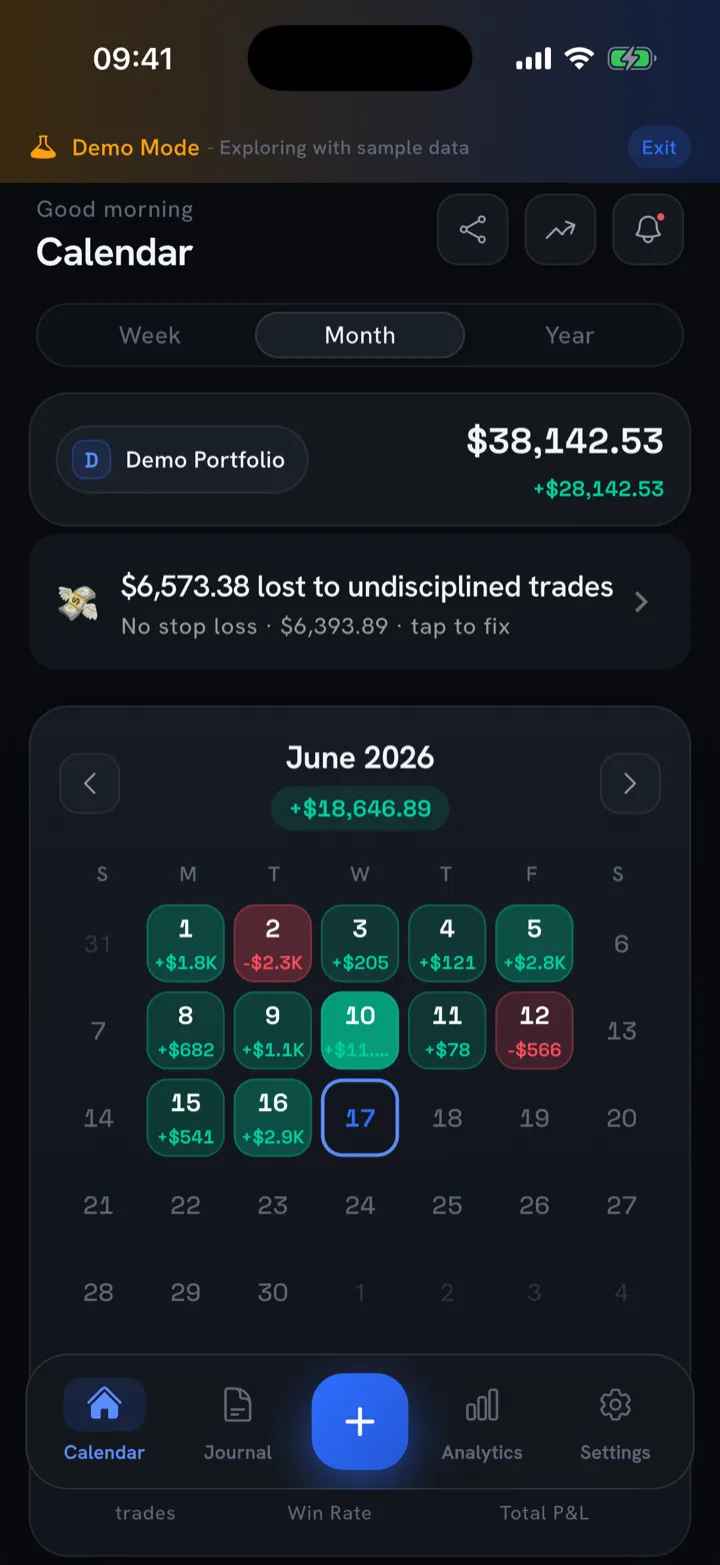
Behind that simple surface, a good PnL calendar tracks more than the daily net:
- Daily net P&L: every trade you closed that day, summed up after fees.
- Weekly and monthly totals. These usually sit in a side column or footer, so you can see whether a good week carried a bad one or the reverse.
- Win rate: the share of trades (or days) that finished green.
- Green days vs. red days. A raw count, which is often more honest than your P&L. You can have more green days than red and still lose money, and that gap tells you something specific.
- Trading days: how many days you actually placed a trade. This exposes overtrading faster than anything else.
Read the number for the size of the day and the color for the pattern across the month. You want both.
Daily, weekly, monthly: three zoom levels
The same data reads differently depending on how far back you stand:
| Zoom level | What it answers |
|---|---|
| Daily | Did I follow my plan today, or did one trade blow up the day? |
| Weekly | Am I consistent, or does one outlier day carry the whole week? |
| Monthly | Is my edge real, or am I flat after a lucky week? |
A spreadsheet can compute all three. A calendar lets you see all three at once, and that is the reason to use one.
Why a visual calendar beats a spreadsheet
Spreadsheets are great at math and bad at memory. You can sort and filter a trade log all day and still not feel the shape of your month. A PnL calendar works because it uses the part of your brain that spots patterns in color and position, the same part that reads a heat map in a second.
A few concrete reasons the grid changes how you trade:
- Loss aversion shows up where you can see it. A cluster of red boxes is uncomfortable in a way that a negative cell in row 47 is not. That discomfort is useful, because it makes you stop and ask what those days had in common.
- Streaks become obvious. Three green days in a row, then a red day twice the size of any green one, is a pattern you’ll never notice scrolling a list. On a calendar it jumps out.
- Empty days count too. The neutral boxes, the days you sat out, are part of the picture. Disciplined traders often have more empty boxes than they expect, and the impulsive months are wall-to-wall color.
- You actually look at it. A calendar takes two seconds to scan, so you check it daily. A spreadsheet takes effort, so it sits unopened. A journal only helps when you open it.
None of this replaces the underlying log. You still want the trade-by-trade detail when you sit down to diagnose something, so use the calendar to find the day and the log to explain it. If you’re building the habit from scratch, our trading journal guide covers what to record so the calendar has good data underneath it.
How to read the patterns
Once you have a few weeks of colored boxes, the calendar starts answering questions you didn’t think to ask. Four patterns are worth hunting for.
Day-of-week patterns
Stack a month or two and watch the columns. Maybe every Monday is green and every Friday bleeds. That’s not superstition. It’s information. Friday red might mean you’re forcing trades into a thin, position-squaring afternoon, or chasing a week that didn’t go your way. Monday green might mean you trade your freshest, most patient setups after a weekend away from the screen.
Say four of your last five Fridays come up red, and the losses run bigger than your typical day. The fix isn’t “trade better on Fridays.” It’s narrower than that: stop trading Friday afternoons, a rule the calendar made obvious.
Streaks and the shape of recovery
Look at runs of color. Healthy trading usually shows clusters of green with the occasional contained red day, a loss that looks like a normal day rather than a crater. The warning sign is a red box that’s two or three times the size of your average green one. That’s a risk-management problem, not a strategy problem.
Recovery shape matters too. After a red day, does the next day come back green and normal-sized? Or does red bleed into a second and third red box, each one bigger? A widening red streak shows you the tilt before your account balance does.
Tilt clusters
This is the pattern that catches the most traders. A tilt cluster looks like one ordinary red day immediately followed by a much larger red day: the revenge trade. On a spreadsheet those are two separate rows. On a calendar they’re two boxes side by side, and the second one is visibly darker and worse.
When you can see that pattern repeat, you stop arguing with yourself about whether you tilt. You have the evidence. From there it’s a system problem, and there are concrete ways to stop revenge trading, like a daily loss limit or a hard stop after a red day, and the calendar will confirm they’re working as the clusters disappear.
Green days that still lose money
Count your green and red days, then check your monthly net. If you have more green days but a red month, your losers are bigger than your winners. That’s a risk-reward and position-sizing issue, and it’s the single most common thing a PnL calendar surfaces. Win rate alone hides it; the color count plus the net total exposes it. If that’s you, it’s worth getting clear on win rate vs. risk-reward and which one your edge actually depends on.
How to start a PnL calendar
You don’t need anything fancy to begin. You need three things: every trade logged, results rolled up by day, and a colored grid you’ll actually open.
The minimum viable version:
- Log every trade, including the small ones and the ones you’re embarrassed by. A calendar built on a filtered log lies to you. Leave out the ugly trades and the colors will flatter you.
- Roll trades up by day. The daily net is the unit a PnL calendar runs on.
- Color the days and look at the month. Green, red, neutral. That’s the whole interface.
You can do this by hand in a spreadsheet with conditional formatting, and plenty of traders start there. The friction is the upkeep. Manual entry is exactly the chore people skip on the days that matter most, which are usually the red ones.
How Trade Buddy does this for you
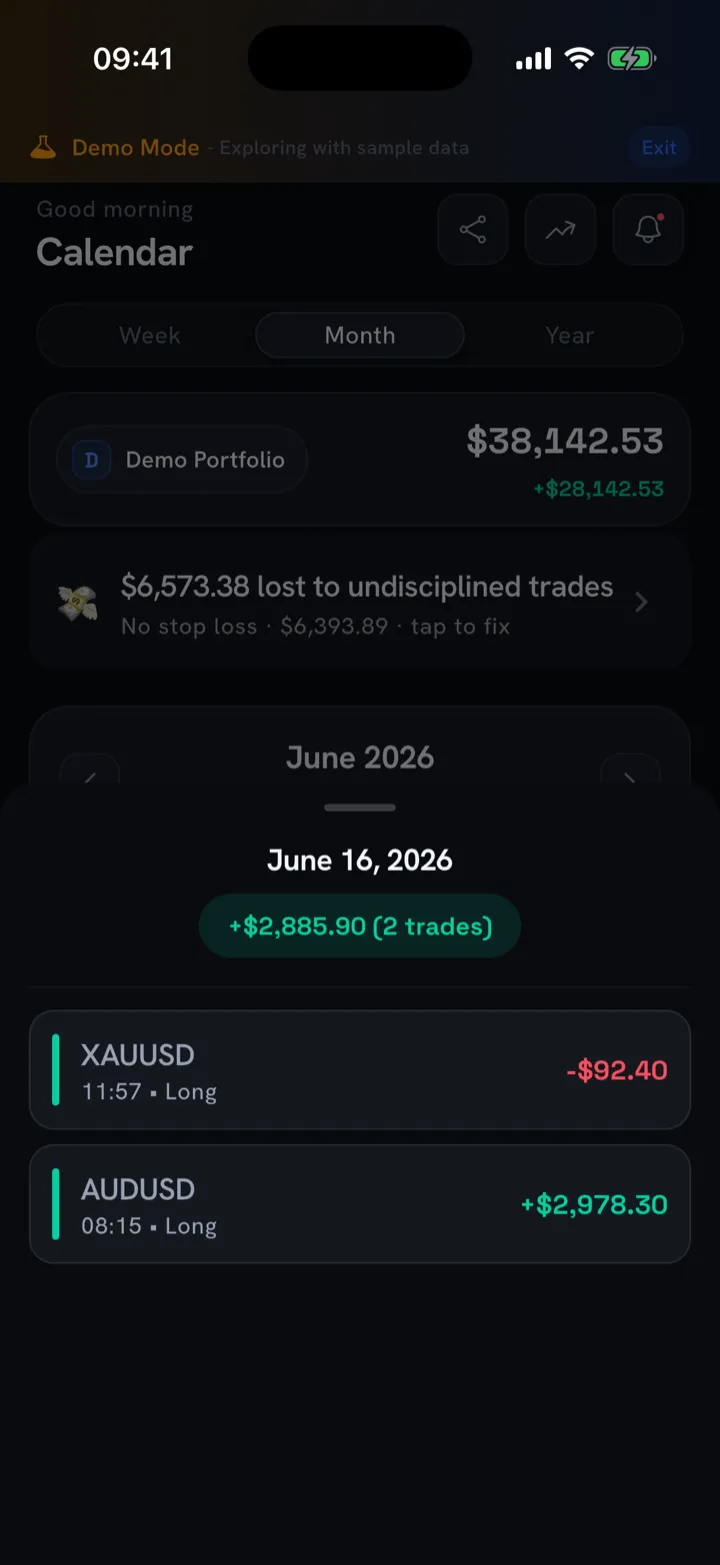
Trade Buddy is built around the PnL calendar so you don’t have to maintain one by hand. Every trading day is color-coded green or red, with the day’s net printed in the box. Tap any day and you see the exact trades behind that number, so one tap takes you from the month view down to the individual fills.
The upkeep problem is handled too. You can log a trade in under five seconds, or snap a screenshot of your MetaTrader 4, MetaTrader 5, cTrader, or TradingView trade-history screen and the app reads every fill and logs it for you. See how the import works if you’re moving from another platform. On top of the calendar you get win rate, green days, trading-day counts, and the pro analytics (Sharpe, Sortino, expectancy, max drawdown) when you want to go deeper, each with a plain-English explainer. No account is required, and your trade data stays on your device.
It’s free forever to start, and you can compare plans on the pricing page. If you specifically want something that lives on your phone, here’s our take on the best trading journal app for iPhone.
The bottom line
A PnL calendar won’t make you a better trader by itself, and it’s not financial advice. What it does is give you something you’ll actually open every day instead of a detailed spreadsheet you never touch. The green and red boxes show you when you tilt and which days quietly cost you money, fast enough that you can change course before the month gets away from you.
Start logging today and let your first month of green and red days build your PnL calendar. Get Trade Buddy free on the App Store.
Frequently asked questions
What is a PnL calendar?
A PnL calendar is a month-view grid where each box is one calendar day, colored green when you finished profitable and red when you lost money. Most versions print the day's net profit or loss inside the box, so you read both the color and the number at a glance instead of scrolling rows of trades in a statement.
How do you read a PnL calendar?
Start with the colors to spot clusters and streaks, then read the number in each box for size. Stack a few weeks and look down the columns for day-of-week patterns, watch for a red box much larger than your usual day, and compare your green-day count against your monthly net total.
What does a red day mean on a PnL calendar?
A red day means your closed trades for that calendar day added up to a net loss after fees. One ordinary red day is normal. The warning signs are a red box two or three times bigger than your typical day, or red days that pile up back to back, which usually points to risk or tilt.
Can I make a PnL calendar in a spreadsheet?
Yes. You can log every trade, roll the results up by day, and color the cells with conditional formatting to get a basic PnL calendar. The catch is upkeep. Manual entry is the chore people skip on losing days, which are the exact days the calendar needs to stay honest about your month.
Is a PnL calendar free in Trade Buddy?
Yes. Trade Buddy is free forever to start, and the PnL calendar is part of the free app. Every trading day is color-coded with the daily net printed in the box, and you can tap a day to see the trades behind it. No account is required and your trade data stays on your device.