 Trade Buddy
Best Trading Journal App for iPhone in 2026: What to Look For
A practical buyer guide to choosing the best trading journal app for iPhone: logging speed, the PnL calendar, imports, privacy and honest analytics.
Searching for the best trading journal app for iPhone usually ends one of two ways: you download something bloated that wants a login before it shows you anything, or you find a clean app that secretly only handles US stocks. Neither helps when you’ve got a phone in your hand and a trade you want to log right now. This guide skips the fake top-10 list and gives you a criteria checklist instead. These are the things that actually decide whether you’ll still be using an iPhone trading journal three months from now.
Why the best trading journal app for iPhone is the one you’ll actually open
A journal only works if you fill it in. That sounds obvious, and it’s the single reason most traders quit journaling: the friction is higher than the payoff on any given day. So before features, the real test is behavioral. Will you reach for it after a loss, when you least feel like it? Will you log the messy scratch trade, the one you would rather skip?
That’s why “best” comes down mostly to speed and low friction, and only then to the depth of analytics underneath. A gorgeous dashboard you visit once a month tells you less than a plain calendar you tap every evening. If you want the full argument for why consistency beats sophistication, we cover it in How to Keep a Trading Journal That Actually Improves Your Results.
Keep that in mind as you read the rest. Every criterion below answers one question: does this remove a reason to skip a day?
The criteria checklist
Use this as a scorecard. Open any candidate app and run it down the list. An app doesn’t need a perfect score, but if it fails the first three, the rest barely matters.
| # | Criterion | Why it decides whether you keep using it |
|---|---|---|
| 1 | Logging speed | If a trade takes 60 seconds to enter, you’ll stop entering them. |
| 2 | PnL calendar | A daily green/red map is the fastest way to spot patterns. |
| 3 | Import options | Manual-only logging dies on a busy week. |
| 4 | Privacy / on-device | Your edge and your P&L are not someone else’s data set. |
| 5 | Honest analytics | Metrics should explain themselves, not flatter you. |
| 6 | Discipline tools | Rules and limits stop the trades that wreck the month. |
| 7 | Price & offline | Predictable cost, works on a plane or in a dead zone. |
Speed, calendar, and imports: the non-negotiables
These first three criteria decide whether an iPhone trading journal survives contact with a real trading week. Fail any of them and the app becomes a chore you eventually drop.
1. Speed of logging
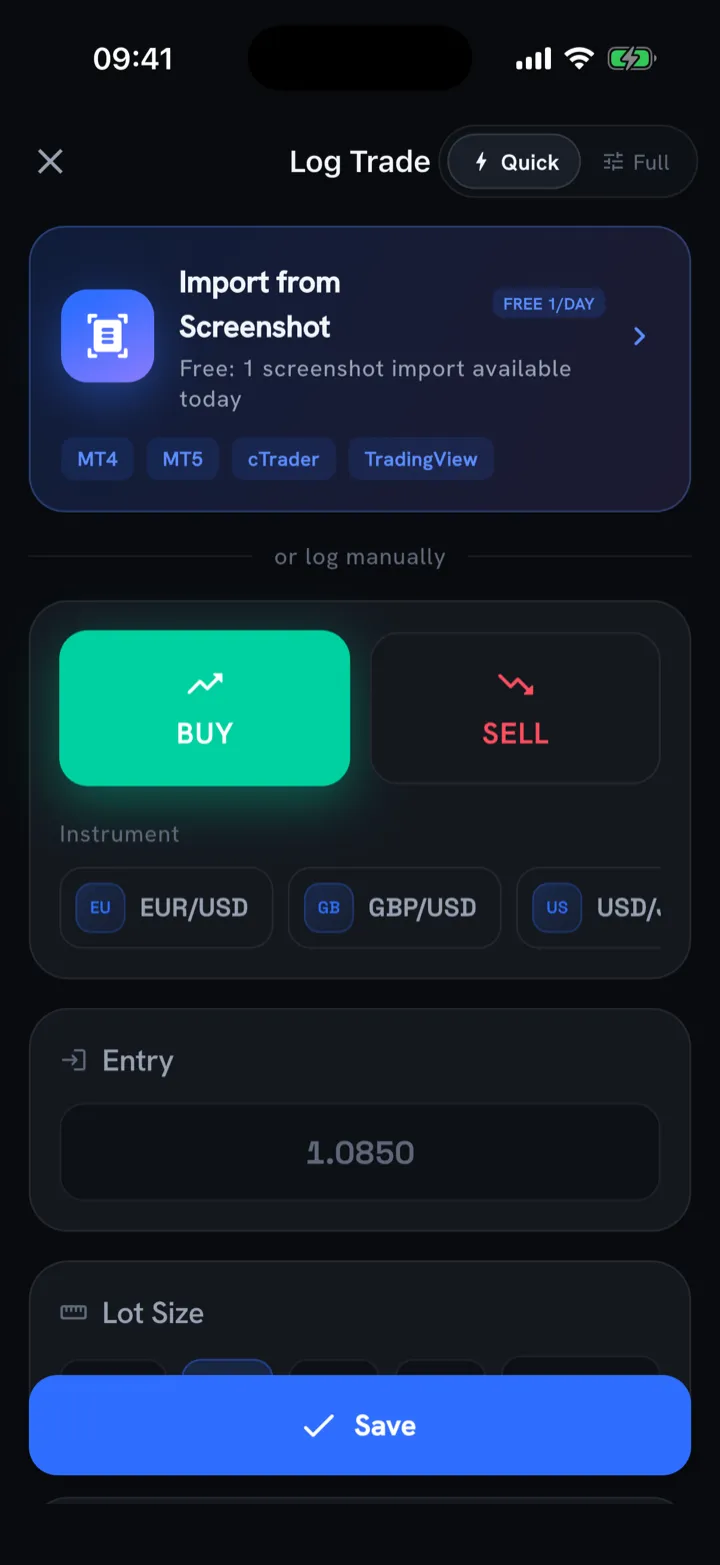
This is the make-or-break criterion on iPhone specifically. You’re often logging on the move, one-handed, between other things. Look for:
- A quick-log path that captures the essentials (symbol, direction, size, result) in a few taps.
- A full manual mode for when you want to attach notes, tags, screenshots, and a rationale.
- Live estimated P&L while you type, so you’re not doing mental math to sanity-check the entry.
If logging a trade takes longer than the trade itself felt, the app has already lost.
2. The PnL calendar
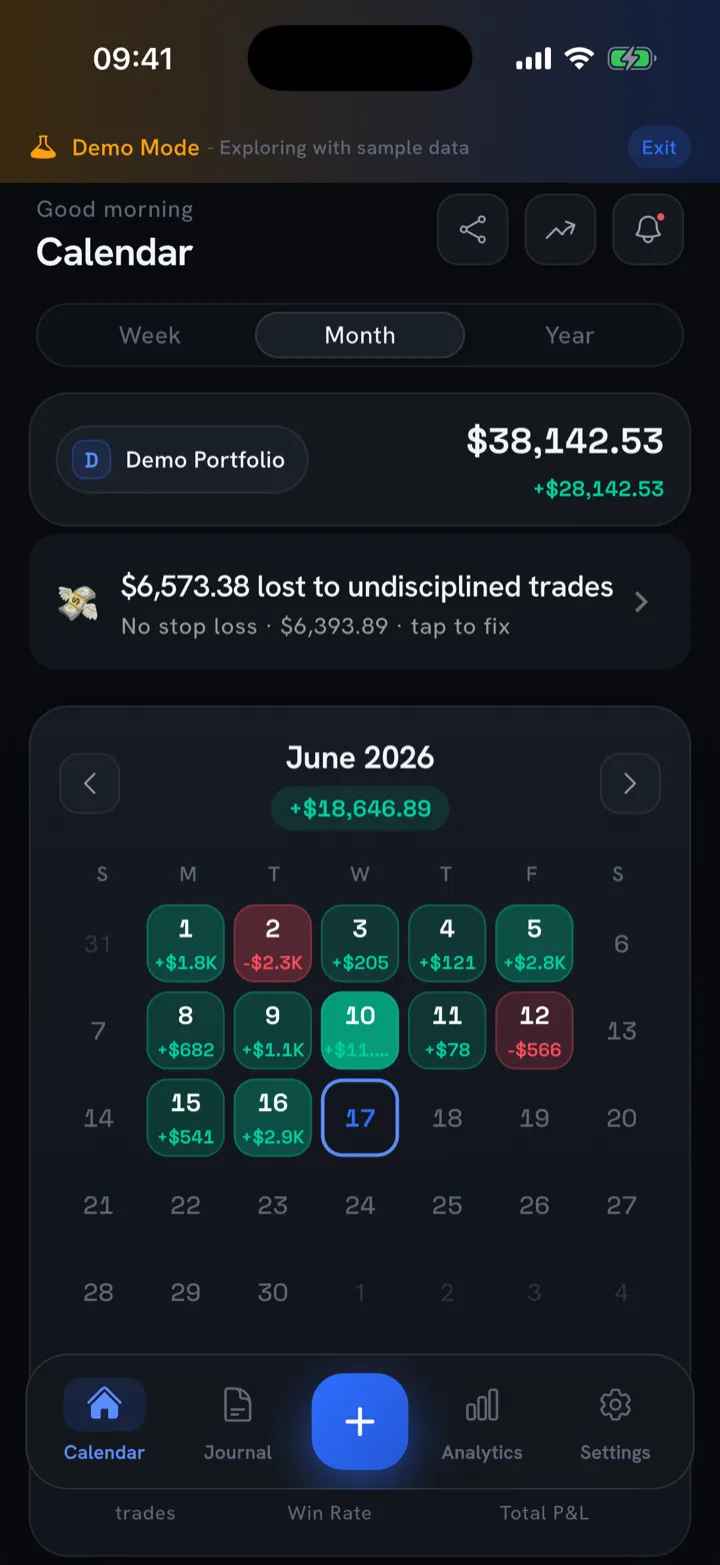
A profit-and-loss calendar shows your results as a grid of colored days instead of rows in a spreadsheet. Every trading day is colored by result, green for a profit day and red for a loss day, and tapping a day expands the trades behind that number. Within a week you start seeing things: the Mondays you overtrade, the red clusters after a big win, the quiet green stretches when you followed your plan.
A good calendar also shows the headline stats at a glance, like win rate, number of green days, and total trading days, without making you dig. If you’ve never used one, What Is a PnL Calendar? breaks down how to read the patterns it exposes.
3. Import options
Manual logging is fine until you have a heavy session or you’re catching up on a backlog. Then it’s the thing that makes you abandon the journal. Two imports matter most:
- Screenshot import. Snap your broker’s trade-history screen from MetaTrader 4, MetaTrader 5, cTrader, or TradingView, and let the app read every fill. This is the feature that quietly saves the most time on mobile.
- CSV import. For bulk history or brokers without a clean screenshot, a CSV path lets you backfill months in one go.
For a step-by-step on the MetaTrader side, see How to Import MT4 and MT5 Trades Into a Trading Journal.
Privacy and analytics you can trust
Speed gets you logging; these two decide whether the journal respects you and tells you the truth.
4. Privacy and on-device storage
Your trade history reveals your edge, your account size, and your worst habits. Plenty of apps treat that as their data to harvest. Before you commit, check:
- Can you use the app without creating an account?
- Does your trade data stay on the device by default, or get uploaded to someone’s server?
- Are exports under your control if you ever want to leave?
On-device storage has a practical payoff too: the app opens instantly and works with no connection.
5. Honest analytics
The temptation in this category is to bury you in numbers that flatter rather than inform. The metrics worth having are the ones that hold up under pressure and explain themselves in plain English:
- Expectancy: the average outcome per trade, the number that actually predicts whether the account grows.
- Sharpe and Sortino: risk-adjusted return, so a smooth equity curve scores better than a lucky lumpy one.
- Max drawdown and recovery factor: how deep the holes get and how well you climb out.
The catch: a 0.9 Sortino means nothing if the app doesn’t tell you what 0.9 implies. Look for a one-line, plain-English explainer next to each stat. Be wary of any “score” that only ever goes up. Honest analytics will point at your leaks as readily as your wins. We rank the metrics that earn their place in Win Rate vs. Risk-Reward.
Discipline, price, and the practical stuff
The last criteria are the ones that protect your account and your wallet over the long run.
6. Discipline and risk tools
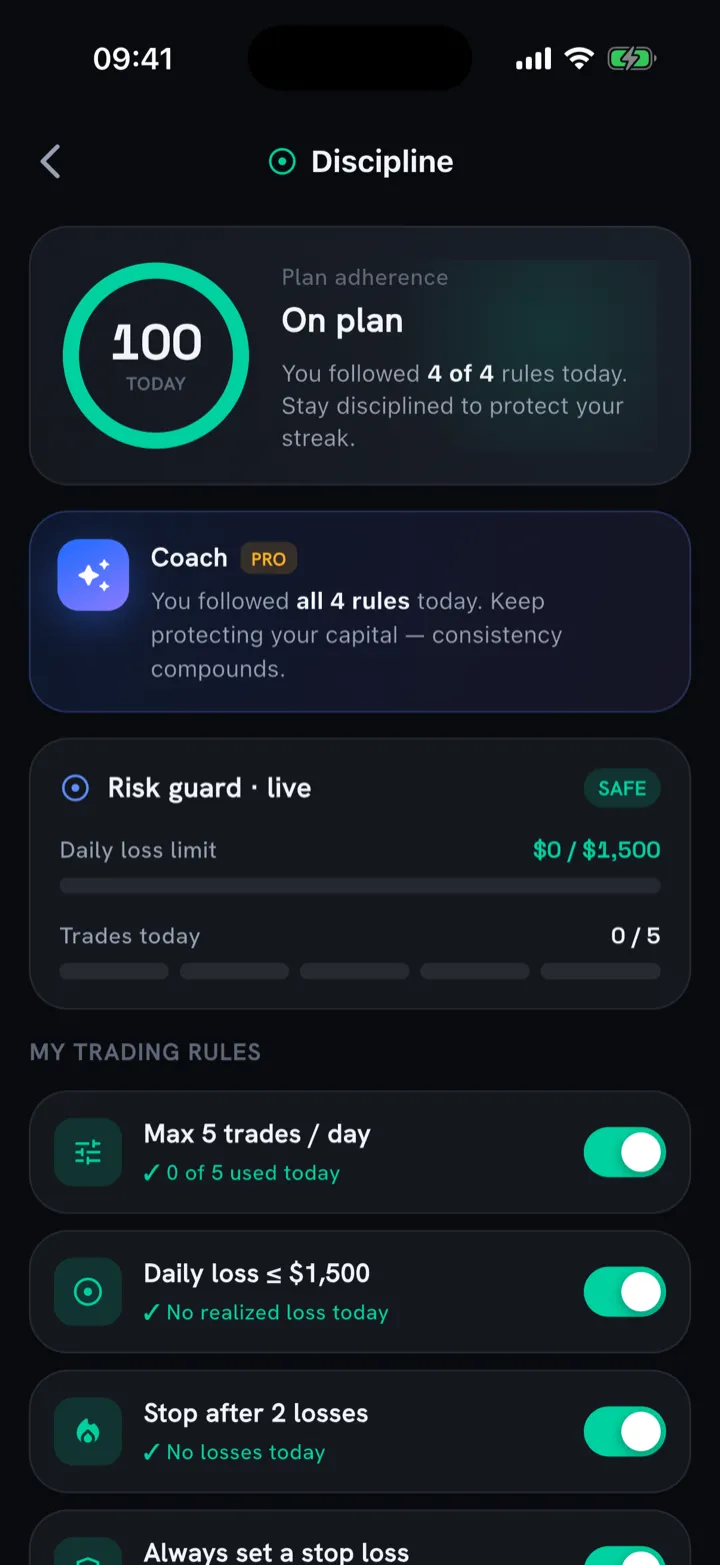
The trades that ruin a month are usually the ones you knew you shouldn’t take. A journal that only records damage after the fact is missing half its value. The stronger apps add guardrails:
- Custom trading rules you define for yourself.
- A daily loss limit that flags when you’ve hit your stop-for-the-day.
- A max-trades guard to catch overtrading before it spirals.
- A plan-adherence score and streaks, so following your process becomes its own scoreboard.
These tools put a wall between a bad moment and a bad position. If revenge trading is your specific failure mode, the system in How to Stop Revenge Trading pairs well with hard limits like these.
7. Price and offline reliability
Last, the practical stuff that’s easy to overlook until it bites:
- Pricing should be predictable. A genuinely useful free tier, a clear paid upgrade, and a free trial so you can test Pro before you commit.
- It should work offline. Logging at the close shouldn’t depend on signal. This follows naturally from on-device storage, since an app that stores data locally just works in airplane mode.
How Trade Buddy maps to the checklist
I’ll be straight about the bias here: this is the Trade Buddy blog. But the app was built against exactly this list, so it’s a fair worked example of what “passes” looks like.
- Speed: quick-log or full manual, a trade in under five seconds, with live estimated P&L as you type.
- Calendar: a color-coded PnL calendar with win rate, green days, and trading-day counts; tap any day for the trades behind it.
- Imports: screenshot import for MT4, MT5, cTrader, and TradingView, plus CSV.
- Privacy: no account required, trade data stays on your device.
- Honest analytics: Sharpe, Sortino, expectancy, max drawdown, and recovery factor, each with a plain-English line, plus an AI coach that flags edges and leaks via a trading-health score.
- Markets and price: Forex, crypto, stocks, options, futures, indices, and gold; free forever, with a Pro upgrade (3-day free trial) on the pricing page.
You can run it against your own version of the checklist on the App Store and see how it scores for your markets and your routine.
One honest caveat that applies to every app on your shortlist: a trading journal is a tool for reviewing your decisions, not financial advice. The edge comes from what you do with the patterns it shows you.
The bottom line
The best trading journal app for iPhone is the one whose friction is low enough that you actually log every trade, whose calendar makes patterns obvious, and whose numbers tell you the truth. A long feature list counts for little if you stop opening the app. Score your shortlist against the seven criteria above, weight the first three heavily, and trust the app you keep opening.
Ready to test one against the checklist? Download Trade Buddy free on the App Store and log your next trade in under five seconds.
Frequently asked questions
What is the best trading journal app for iPhone?
The best trading journal app for iPhone is the one you will actually open every day, so judge it on logging speed first, then on its PnL calendar, import options, privacy, and honest analytics. An app that captures a trade in a few taps beats a feature-heavy dashboard you visit once a month. Score your shortlist and keep the one with the least friction.
Is there a free trading journal app?
Yes. Several trading journals offer a free tier, and Trade Buddy is free forever for core journaling, with a Pro upgrade (3-day free trial) for advanced analytics. A useful free tier should let you log trades, view a PnL calendar, and see basic stats without an account, so you can test the habit before you pay anything.
Does it work offline?
Yes. A journal built around on-device storage works offline, so you can log trades at the close even on a plane or in a dead zone with no signal. Trade Buddy keeps your data local by default, which means the app opens instantly and never waits on a server to record a new trade or show your calendar.
Can it import from MetaTrader?
Yes. Trade Buddy imports trades from MetaTrader 4 and MetaTrader 5, along with cTrader and TradingView. You snap a screenshot of your broker trade history and the app reads each fill, or you upload a CSV for bulk history. Screenshot import is the fastest way to backfill a busy week on your phone without typing every trade by hand.
Is my trade data private?
Yes. Trade Buddy stores your trade data on your device, and you can use the app without creating an account, so your history is not uploaded to a server to be harvested. Your trades, account size, and results stay with you, and exports stay under your control if you ever decide to move your journal somewhere else.